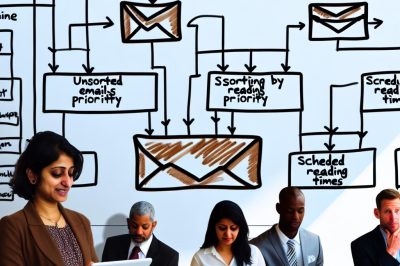
Understanding Email Batching
Email batching involves grouping several emails and addressing them at designated times instead of handling them as they arrive. This strategy can significantly enhance focus and productivity. By concentrating on emails in a batch, you reduce the constant interruptions that can derail your workflow. For more detailed strategies on improving productivity, you can explore this resource on handling work distractions.
Setting Up Specific Time Slots
One effective method to batch emails is to allocate specific time slots during the day solely for checking and responding to emails. Ideally, you might choose two or three time slots—morning, mid-afternoon, and late afternoon. By doing this, you create uninterrupted work periods that allow you to focus on tasks requiring attention and creativity.
The beauty of setting these time slots lies in the predictability they offer. When you check emails at set intervals, your mind can better sync with your work tasks, creating a more harmonious day. Moreover, team members and your clients will adapt to this schedule, reducing the urgency they may feel to get immediate responses. It can even help balance the workload by setting similar standards in team-based environments.
Minimizing Interruptions
Constant notifications are a main source of interruption in a workday. To implement email batching effectively, it’s essential to turn off email notifications. This step ensures that your focus isn’t disrupted by the sporadic arrival of new emails. Instead, you control when to check your email inbox.
Beyond just turning off notifications, you might consider turning off potentially distracting devices when not in active use. Not only does this extend your focus further, but it also creates a zone of tranquility conducive to more thoughtful and involved work.
Using Filters and Labels
To efficiently manage incoming emails, consider using filters and labels. Most email platforms provide options to automatically sort emails into categories or mark them as important. By organizing emails as they come in, you can prioritize which batches need attention first during your designated email times.
Implementing these filters and labels ensures that you do not overlook crucial emails that require immediate attention. Through personalization, emails of higher significance can be easily spotted, while less pressing communications can be sequenced accordingly. This methodical arrangement enables a seamless adaptation to the varied urgency levels inherent in emails, preventing potential stress or pressure build-up.
Setting Expectations
Communicating your email batching strategy with colleagues and clients is crucial. Let them know about the changes to your email response schedule to manage their expectations effectively. This communication ensures others are aware of your focus strategy and know that there may be a delay in your response.
By openly sharing your approach, you not only clarify any potential miscommunications but also set a precedent that others may wish to follow. This can create a more balanced working atmosphere, fostering an environment where the slant is more towards efficiency and less towards overwhelming immediate responses.
Utilizing Email Tools
Many email clients offer tools and add-ons to aid in email batching. Consider using tools that assist in scheduling emails for later sending, which can help manage email flow better. Some tools also provide analytics on email habits, offering insights into how email usage affects productivity.
These tools often come equipped with features such as auto-responses or forward automation, delivering exceptional flexibility in managing your time and email communication. As you gain insights from analytics, you can make tailored adjustments to your email handling approach, ensuring it aligns with your productivity goals and working style.
Maintaining the Discipline
Adopting email batching requires discipline. Initially, it might be challenging to resist the urge to check emails outside the designated times. However, maintaining this discipline is key in reaping the benefits of increased focus and productivity over time.
Developing a commitment to this new method demands self-awareness and consistency. You might start by tracking your progress and celebrating small victories when you succeed in sticking to your plan. Over time, the discipline becomes second nature, contributing to a more streamlined work process.
Conclusion
Email batching is a simple yet powerful technique to enhance productivity by minimizing interruptions caused by emails. By allocating specific times for email checking, turning off notifications, and utilizing tools and filters, individuals can maintain better focus on their tasks. With time and consistency, this strategy can transform how you handle work communications, making workdays less hectic and more engaging.
In adopting email batching, you’re not just modifying a habit; you’re embarking on a change in how you interact with work. By controlling the inflow of information, you regain power over your time and mental space, leading to a more productive and satisfying work life.