Email Overload: The Growing Challenge
Email has become an integral part of our daily communication, yet it can also become a source of frustration when our inboxes are flooded with irrelevant or unnecessary messages. While email communication was designed to enhance connectivity and efficiency, the excessive influx of unsolicited newsletters, offers, and notifications often leads to a cluttered inbox, making it challenging to find important communication swiftly.
Understanding Unsubscribing: A Necessary Step
The importance of unsubscribing from certain emails is, therefore, more pressing than ever. Keeping your inbox clutter-free is not merely an act of housekeeping; it is crucial for ensuring that important emails are prioritized and visible. Often, the difficulty lies not only in the volume of emails received but in determining which communications are unnecessary and which are valuable.
Unroll.Me and other similar tools offer a way to tackle this issue by providing mechanisms to sort through subscription-based emails. Effective management allows you to focus on what truly matters, reducing the chances of missing significant emails from colleagues, friends, or family.
Steps to Simplify Unsubscribing
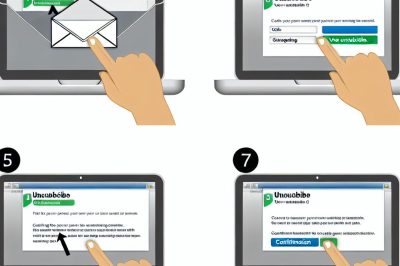
The process of unsubscribing may seem daunting but becomes manageable with a structured approach. The following steps aim to provide clarity and guidance for those seeking to declutter their inboxes:
Review Email Content
The initial step involves examining the contents of your inbox. Identifying emails that no longer serve a purpose, whether they are old subscriptions that are no longer relevant or promotional offers that are not of interest, is vital. The ability to discern between valuable and negligible emails is important for maintaining an efficient inbox.
Locate Unsubscribe Links
Most legitimate promotional emails contain an ‘Unsubscribe’ link, often located at the email’s footer. Many companies also offer options to ‘Manage Preferences’, which gives you the flexibility to choose what communications to receive. These links, when clicked, typically direct you to a page where you can opt out of future mailings easily.
Email Management Tools at Your Disposal
Using dedicated email management tools can significantly simplify the unsubscribing process. These tools efficiently scan your inbox for emails that belong to marketing lists and provide consolidated opportunities to unsubscribe. Unroll.Me is a popular choice, allowing users to unsubscribe from multiple lists without accessing each separately.
Customizing Email Settings
Your email provider may offer features that assist in managing unnecessary emails. Platforms like Gmail or Outlook often have designated folders or tabs such as ‘Promotions’, easing access to commercial emails that generally include easy-to-spot unsubscribe buttons. Additionally, filters and rules can be created to divert newsletters into specific folders or delete them automatically, further assisting in maintaining an orderly inbox environment.
Recognizing and Preventing Phishing Scams
With cyber threats on the rise, it’s essential to approach unsubscribe links with caution. Scammers frequently use emails designed to replicate legitimate correspondence to deceive users into revealing personal information. Verify the authenticity of the unsubscribe option by checking the sender’s details or accessing the company’s official website where subscription preferences can be changed directly.
Your Right to Unsubscribe
It’s worth understanding the legal frameworks that safeguard your right to unsubscribe. Regulations such as the GDPR in the EU and the CAN-SPAM Act in the US enforce strict guidelines on businesses to honor unsubscribe requests promptly. Familiarizing yourself with these laws can empower you to manage your email subscriptions more effectively.
The Importance of Regular Review
To maintain a streamlined inbox, it’s advisable to regularly reassess your email subscriptions. Scheduling routine checks can prevent the re-accumulation of unwanted emails. By periodically evaluating which subscriptions continue to provide value, you can sustain an organized email ecosystem, ultimately enhancing both personal and professional productivity.
In conclusion, the act of unsubscribing is more than just an option; it’s a necessary practice for efficient digital communication management. With the steps outlined and the tools available, you can take control of your email, ensuring that your inbox is not just an endless stream of information but a tool that serves its intended purpose—aiding in effective communication. Embrace the strategies provided to reclaim your inbox today.