Organizing Emails with Simple Folders
In today’s digital age, managing email efficiently is crucial for both personal productivity and professional success. While there are various advanced tools available, one of the most straightforward methods for staying organized is by employing folders in your email client. This method is not only easy to implement but also offers significant benefits in keeping your inbox tidy and ensuring that essential messages are at your fingertips. For those looking to dive deeper into the specifics of setting up folders, detailed guides are available from providers like Gmail Support and Outlook Support.
Understanding Folders in Email
At its core, email organization via folders is akin to using file directories on your computer. Just as files are grouped according to their relevance in directories, emails can—and should—be categorized into folders or labeled thoughtfully. Common email clients such as Gmail and Outlook offer robust folder systems that empower users to manage their correspondence efficiently. By understanding the fundamental concept of these folders, users can gain better control over their inboxes. Folders allow users to group emails by categories like subject, sender, or urgency, making retrieval and management straightforward and stress-free.
Creating Folders
The first step in organizing emails with folders is to define the categories that suit your communication patterns best. Think about the primary themes that dominate your inbox. For instance, individuals might find it useful to set up folders such as “Work,” “Family,” “Finance,” or “Travel.” Once you have identified these categories, navigate to your email client. In Gmail, you would typically look for the “Create new label” option, while in Outlook, you would use “New Folder.” This option is generally accessible from the left-hand sidebar or within menu lists. When naming your folder, choose titles that are clear and indicative of the emails they will contain, ensuring that the folder name quickly brings to mind its intended purpose.
Filing Emails into Folders
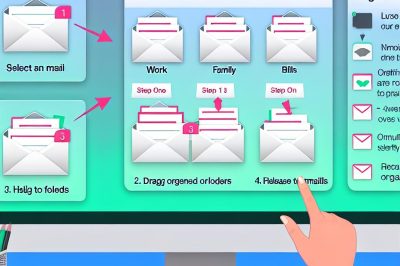
An organized folder system remains ineffective unless emails are regularly filed into their respective folders. To achieve this, apply one of two common methods: select the email in question and use the “Move to” option to choose its target folder, or simply drag and drop the email into the designated folder. This systematic approach helps maintain a clean inbox—one of the primary benefits of using folders. By establishing a regular routine of filing emails, users can avoid facing an overwhelming inbox and support a faster response time when important messages need to be found and addressed swiftly.
Maintaining Folder Organization
Creating folders and filing emails is only the beginning; the true value of an email folder system lies in its ongoing maintenance. It is imperative to develop a habit of periodic reviews of each folder’s contents. Regular auditing of your folders can help you identify emails that are outdated or irrelevant, which can then be archived or deleted to free up space and ensure the folder system remains efficient. This practice not only helps in reducing clutter across your email client but also aids in maintaining quick access to crucial emails, which can significantly enhance daily productivity.
Advanced Tips for Folder Management
Beyond the basics of creating and maintaining folder organization, several advanced tips can enhance the functionality of this system. Consider setting up subfolders within larger categories for a more granular organization of emails. For instance, under a general “Work” folder, subfolders could be created for “Projects,” “Clients,” or “Reports.”
Leverage the power of rules or filters—many email clients allow users to set conditions under which emails automatically move to designated folders upon arrival. This can significantly reduce the manual effort of filing emails and ensure that you do not miss important correspondence.
Another useful tip is to integrate color-coding or icons with your labels or folders if your email client supports these features. Visual cues can make folder navigation much faster, particularly if you’re managing a large number of categories.
Additionally, purging folders or setting up a routine archive schedule every quarter or bi-annually ensures that your folder system does not become an extension of your inbox clutter. It’s about keeping things crisp and current, allowing the folder system to serve its purpose effectively.
Conclusion
In conclusion, the strategic use of email folders represents a simple yet highly effective method to manage overwhelming inboxes. The best part is that it can be tailored to meet individual preferences, ensuring personal and professional email management is as streamlined as possible. By investing time upfront to set up and routinely manage an email folder system, you can transform email chaos into clarity, providing a more organized digital environment conducive to productivity. Whether for personal convenience or professional efficacy, embracing folders in your email routine could very well be a game-changer in how you approach daily communications.